Slide Shows
This is an interactive method for selecting
photos to view based on what search arguments you
want.
Give it a try. It is a lot of fun.
New for 2007.
Instructions on how to use Pete's Side Shows program.
The default I have set gives you a working example of how the
program works.
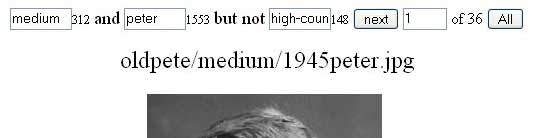
[medium] is the first search
argument. You can type anything in here and hit [next]
or [all]
312 is the total number of
occurrences of this argument
and tells the relationship
between the first search argument and the second one.
[peter] is the second search
argument You can type anything in here and hit [next]
1553 is the total number of
occurrences of this argument
but not tells the
relationship between the first two search argument and
the third one.
[high-country] is the third
search argument. You can type anything in here and hit [next]
148 is the total number of
occurrences of this argument
[next] shows you the next
photo for these search arguments
[1] relative number in the
list. You can type any list number in here and hit [next]
of 36 total number in the
list.
[all] does everything [next]
does but also shows all the pictures below instead of
just the name. Made for those of you with fast
Internet connections.
This list that runs down the left side show the names
of the files your search found.
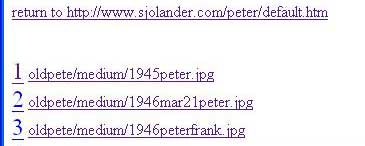
return to takes you back to
this page.
1 2 etc is the relative
number of this photo in this search pattern. This
number can also be used to just look at a single photo
way down the list by entering one less than the photo
you want and then clicking next. The number at the
front is hot linked to default.htm for this tree
branch.
file name with directory tree
The jpg is hot linked to the same file name but
with the jpg replaced with htm. By my convention,
this often takes you to some text about the photo. And
often a choice to view a larger version of the same
photo.